
TL;DR
Register NexusTrade in Gemini CLI, complete browser sign-in with its MCP authentication command, then inspect the available tools. Start with a read-only filing request and compare the returned period, filing date and source. Verify the intended account separately before using owned portfolios. Keep company facts and interpretations distinct, and retain the accepted job ID when polling paid research. A finished company brief still needs explicit trading rules before it becomes a strategy test.
Connect Gemini CLI in the intended environment
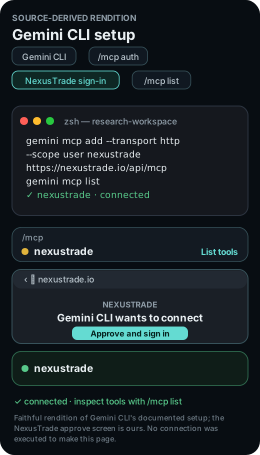
gemini mcp add --transport http --scope user nexustrade https://nexustrade.io/api/mcp
gemini mcp list
Scroll horizontally to read the full command, or copy it.
- Scope choice
- This command uses user scope. Use project scope if the connection should belong only to this workspace.
With Gemini CLI installed, run the registration command below in your research workspace. Start gemini, enter /mcp auth nexustrade and finish NexusTrade browser sign-in. Use /mcp list to inspect the tools.
Try a public filing read in Gemini CLI
Inspect the request
Run the public filing request after connecting. A fresh response may return a later filing; compare its reporting period, filing date and source URL.
Recorded NexusTrade filing reference
NexusTrade MCP sec_edgar returned this listing in Codex on 2026-10-12. Use it as a reference when checking your own connection.
Show the table · 5 rows, 2 columns
| Returned field | Recorded result |
|---|---|
| Company | Apple Inc. |
| Form | 10-Q |
| Filing date | 2026-07-31 |
| Period ended | 2026-06-27 |
| Accession | 0000320193-26-000020 |
No matching rows. Clear the filter to see all records.
Choose a separate next task
These guides are independent choices after the connection check. Review any proposed paid research, historical test or portfolio change before authorizing it.
Verify access with a read
Ask Gemini to show the available NexusTrade tools and read a portfolio you already own. Compare the returned portfolio ID and name with your NexusTrade account. For a new account, ask it to inspect an available dataset schema instead.
The server list shows configuration and connection status. Read an owned record to check that Gemini reaches the intended NexusTrade account. Keep the first check read-only so you can resolve access problems before creating research jobs or changing a strategy.
Build a company brief you can inspect
Use the terminal workspace to keep the brief, source list and follow-up questions together. Ask for reported facts first, then a separate explanation of what they might mean. Review the proposed paid research job before submitting it.
Research AAPL using NexusTrade. Start with its latest available SEC filings and dated news. Save a brief with the reporting period, publication date, source URL and important figures for each claim. Separate reported facts from your interpretation. List missing evidence and propose one follow-up research question for my review. Do not submit paid research, backtests or account changes yet.From a question to evidence
Read filings
NexusTrade toolsec_edgar
Output to inspectIssuer, accession, reporting period and publication date
Read relevant news
NexusTrade toolsearch_stock_news
Output to inspectDated publisher links; distinguish news from filings
Submit bounded research
NexusTrade toolresearch_topic
Output to inspectresearchJobId and source-backed question
Poll the accepted job
NexusTrade toolget_research_status
Output to inspectSame research_job_id, completed report and citations
Show the table · 4 rows, 3 columns
Scroll sideways to compare all columns. Select a heading to sort.
| Read filings | sec_edgar | Issuer, accession, reporting period and publication date |
| Read relevant news | search_stock_news | Dated publisher links; distinguish news from filings |
| Submit bounded research | research_topic | researchJobId and source-backed question |
| Poll the accepted job | get_research_status | Same research_job_id, completed report and citations |
No matching rows. Clear the filter to see all records.
research_topic is asynchronous. Poll get_research_status with the same job ID instead of launching another billed research run for the same question.
Read the output before testing a strategy
The finished brief should identify the issuer, show dates and link each material claim to its source. An absent figure belongs in the missing-evidence list. Keep estimates separate and identify their method.
If the brief suggests a trading thesis, write the universe, entries, exits and position sizing before testing it. A model evaluation measures an exact model version on a particular task; using Gemini CLI does not inherit those scores or establish a trading return.
Optional: check the account before owned-record changes
Optional: verify an owned portfolio before changes
Skip this step if you only want to inspect the public filing in the next step. Before reading or changing an owned portfolio, ask for a read-only list, inspect one returned ID with get_portfolio and compare its name, strategies and deployment type. An authenticated empty list is valid for a new account.
What you should see: For owned records, you have the intended account response or an authenticated empty response. Resolve an account mismatch before saving anything. Public filing inspection does not require an owned-portfolio read.
- Identity boundary
- A server list or public filing read does not verify access to your owned portfolios.
Use only NexusTrade read tools. Call fetch_portfolios, then get_portfolio with one returned portfolio ID. Report the ID, name, strategies and deployment type. If the authenticated list is empty, report that result. Do not create, edit, backtest, deploy or place orders.
No comments yet.