TL;DR
A reported holding alone cannot establish that an institution added, increased or sold it. The October 10, 2026 Berkshire snapshot shows 227,917,808 Apple shares for June 30, publicly available August 15, but this guide lacks an earlier comparable filing and a delivered change notification. Compare effective filings and share counts first. For ongoing monitoring, verify the managed list's successful refresh and configure membership alerts or scheduled briefs separately; membership changes do not capture every change in share quantity.
Recorded disclosure illustration
Open the original disclosure illustration
What the public product actually shows
Show the table · 3 rows, 3 columns
Scroll sideways to compare all columns. Select a heading to sort.
| AAPL — Apple | $65,950,296,923 | 227,917,808 |
| AXP — American Express | $51,282,319,275 | 151,610,700 |
| KO — Coca-Cola | $32,508,000,000 | 400,000,000 |
No matching rows. Clear the filter to see all records.
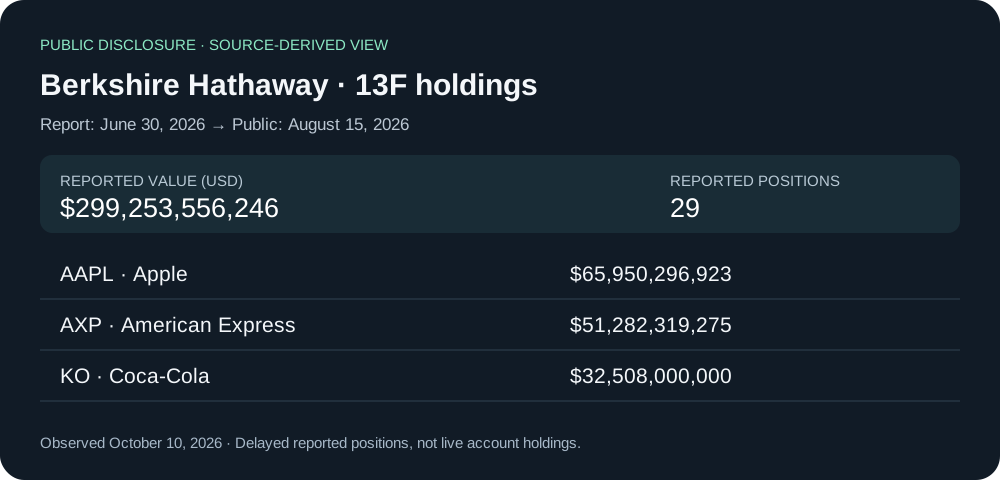
Read on October 10, 2026: Berkshire’s June 30, 2026 filing became publicly available on August 15. NexusTrade shows 29 reported positions worth $299,253,556,246. Apple accounts for $65,950,296,923, American Express $51,282,319,275 and Coca-Cola $32,508,000,000. Values are reported US dollars; share amounts are a different field.
These are delayed reported positions, not a live brokerage account. The 29 positions are not necessarily 29 companies or 29 managed-list members: share classes and eligibility matter. The public page records one effective filing, no unresolved ticker positions and no put/call positions for this snapshot.
A source-backed review note
Example: ‘Berkshire reported 227,917,808 Apple shares worth $65,950,296,923 for June 30, 2026. The filing became public August 15; I inspected the source-linked NexusTrade snapshot October 10. This is a reported position, not a purchase executed August 15.’
No delivered change notification was captured for this guide. Without an earlier comparable effective filing, Apple cannot be labeled newly added, increased or sold.
Follow one real holding
Inspect the recorded Apple position
Start with this recorded Apple position on Berkshire’s NexusTrade page. The filing covers June 30, 2026 and became public on August 15. These dates answer different questions.
Open Berkshire’s actual holdings- Apple shares reported
- 227,917,808
- Apple value reported
- $65,950,296,923
- Holdings measured on
- June 30, 2026
- Available to readers on
- August 15, 2026
The recorded October 10 snapshot contains 29 reported positions. Open the linked filing to check Apple’s shares and reported dollar value.
Find the earlier filing
Compare the same security in an earlier, comparable effective filing. Match shares and reporting periods before deciding whether the position changed.
This example has one effective filing. It establishes a reported holding, but cannot establish an increase, a new position or a sale.
Ask Aurora to check the comparison
Open the prepared research request. Ask for the filing link and keep any missing comparison clearly unresolved.
An explanation you can check against the cited filing. The request does not save a watchlist or start trading.
Monitor the source, then review the change
Read the detailed monitor the source, then review the change
This workflow asks what new public disclosure changed a research list and deserves follow-up. It differs from exporting filing records. Begin with one manager or a defined insider purchase scope; keep report period, filing availability and list refresh dates separate.
- Open the public manager page and inspect the source filing and availability date.
- Follow the complete managed-watchlist tutorial below: preview, save the inactive chat draft and read it back.
- Explicitly choose paper maintenance after reviewing the source, account capacity and schedule. The producer-only example contains no trading action.
- After a successful tick, inspect Portfolio producer on the saved list. Verify its successful refresh before using the members.
Choose change alerts and scheduled briefs separately
Read the detailed choose change alerts and scheduled briefs separately
- Open the managed list’s Notifications settings. Choose membership-change alerts for added and removed symbols; select in-app and email independently.
- Save, reload and check persistence. Membership alerts do not report every change in a filer’s share quantity.
- Choose a scheduled Aurora brief separately for a recurring explanation. Read its cadence before saving.
- Follow source links for changed names and compare like-for-like periods and versions. Do not infer an undisclosed trade from list membership.
- Pause the verified paper producer when maintenance is no longer wanted; confirm it is inactive and retain its history.
Treat incomplete evidence as an exception
Read the detailed treat incomplete evidence as an exception
An incomplete filing, unresolved ticker or coverage error is not an empty book. A 13F position, Form 4 purchase and congressional amount range describe different observations; retain those meanings before combining signals. A positive insider purchase scope excludes grants and sales and uses first public availability.
Do not rebalance from an unconfirmed refresh. Review source completeness and any proposed allocation rules, capital budget and account approval separately.
No comments yet.