
TL;DR
Connect Claude.ai, inspect the dividend strategy's rules, save a draft and run one historical test. The completed example below shows what to inspect. Review its costs, drawdown and longer comparison before changing the strategy.
Inspect the recorded 2025 through 2026 simulation
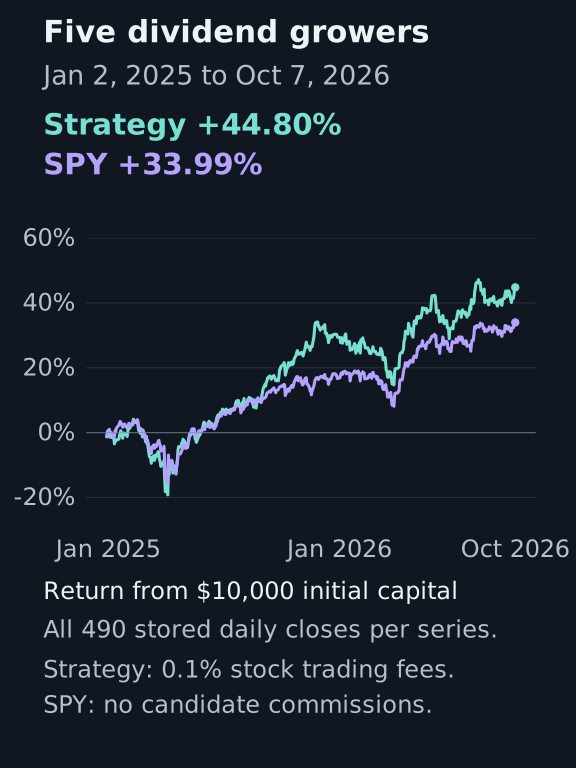
- Strategy return
- 44.80%
- SPY return
- 33.99%
- Maximum drawdown
- 24.33%
- Strategy fees
- $24.15
NexusTrade recorded this simulation on October 8, 2026. Read the drawdown and the longer comparison below alongside the return.
1. Connect Claude.ai
https://nexustrade.io/api/mcpScroll horizontally to read the full command, or copy it.
Open Customize, Connectors and add a custom connector named NexusTrade using the URL above. Complete OAuth, then enable NexusTrade with +, Connectors in this conversation. For Team or Enterprise, an authorized organization owner first adds the connector; each member connects their own account.
2. Review the strategy rules
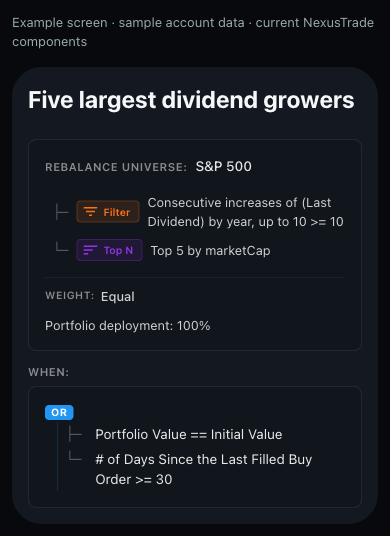
The strategy selects the five largest qualifying SP500 companies by market value, weights them equally and targets full deployment. It checks a ten-year consecutive dividend-increase condition. Rebalancing triggers when portfolio value equals initial value or at least 30 days have passed since a filled buy.
3. Save your reviewed draft
Copy this request into the connected Claude conversation. Review the displayed rules, then save the draft and keep its returned ID.
Reproduce the five-dividend-growers experiment in Claude.ai. Read the exact configuration at https://nexustrade-prod.nyc3.cdn.digitaloceanspaces.com/Explore/Data/existing-dividend-five-configuration-20261010-2468740bdaf783a8.json. Pass the complete configuration to build_portfolio. Show valid, issues and canonical rules. Preserve the universe, filter, ranking, weighting, rebalance trigger, fractional shares and dividend policy. After I approve the rules, save the same JSON with create_portfolio, then read the returned portfolio_id with get_portfolio. Record that chat draft ID. Stop before backtesting or deployment.4. Run the historical test
Replace the placeholder with the returned chat draft ID. Review these inputs, then approve one backtest_portfolio call. They match the displayed 2025 run. Save the accepted backtest ID before leaving the conversation.
generate_events is false for the curve comparison. Enable it when you want to inspect individual signals and orders; detailed event capture uses more credits. Keep all other settings fixed when making that inspection run.
Show the table · 7 rows, 2 columns
| Input | Explicit choice |
|---|---|
| portfolio_id | Exact returned chat draft ID |
| start_date / end_date | 2025-01-02 / 2026-10-07 |
| interval | Day |
| initial_value | 10000 |
| baseline_symbol | SPY |
| fee_config / dividend_policy | Stock: 0.1 percent; reinvest |
| generate_events | false for the curve; true for detailed signal and order inspection |
No matching rows. Clear the filter to see all records.
{
  "portfolio_id": "REPLACE_WITH_RETURNED_CHAT_ID",
  "start_date": "2025-01-02",
  "end_date": "2026-10-07",
  "interval": "Day",
  "initial_value": 10000,
  "baseline_symbol": "SPY",
  "generate_events": false,
  "dividend_policy": "reinvest",
  "fee_config": {
    "Stock": {
      "amount": 0.1,
      "type": "percent"
    }
  }
}
5. Inspect the result and a rebalance
Poll query_backtest_status with the accepted backtest_id. PENDING or RUNNING means continue with that same ID. Resolve a reported ERROR before changing the experiment. Once complete, read query_backtest_history and follow pagination for the full period. Save the completed statistics and history with the rules and inputs.
Compare value with comparisonValue, then follow cash and positionValue around a rebalance or drawdown. With detailed events enabled, ask the client to read query_backtest_events and explain which condition fired, which stocks qualified, how weights changed and which orders filled. Keep the explanation tied to returned records.
Use the accepted backtest_id to poll query_backtest_status until complete. Then read query_backtest_history with that same ID, page 1 and page_size 500; follow all pages. Show the strategy and SPY curves, return, maximum drawdown and fees for 2025-01-02 through 2026-10-07. Explain one rebalance or drawdown using cash, holdings and recorded order events when available. Preserve the returned IDs and source fields in the experiment record. Keep polling the existing test rather than submitting another.Compare the other recorded periods
Total returns through October 7, 2026 from different start dates, each with $10,000. Strategy stock fills cost 0.1%; stored SPY pays no candidate commissions. These durations are separate comparisons.
Show the table · 3 rows, 6 columns
Scroll sideways to compare all columns. Select a heading to sort.
| 2025-01-02 | 44.80% | 33.99% | 24.33% | 49 | $24.15 |
| 2022-01-03 | 134.94% | 73.13% | 24.16% | 153 | $103.47 |
| 2014-01-02 | 340.90% | 419.23% | 24.16% | 422 | $331.98 |
No matching rows. Clear the filter to see all records.
The same rules also have completed runs starting in 2022 and 2014. Compare the full period table before selecting a variant; the long 2014 run returned less than SPY.
Check the universe used by the simulation
Historical S&P 500 membership at each date is not established by this recorded example. Treat the longer window as a retrospective simulation, then verify universe membership and data availability before interpreting it as an investable historical selection.
Create one variant, then test unseen dates
Save a separate variant that changes only SelectTop.limit from five to ten. Keep the universe, dividend filter, weights, capital, fees, interval and development dates fixed. Record both configurations and their completed backtest IDs before comparing return, drawdown, holdings and turnover.
After choosing a candidate, freeze its configuration and decision criteria. The three displayed historical periods have already been inspected. Select another chronological period you have not used in the example, corpus search or variant selection, then evaluate the frozen candidate once. Keep further revisions in a new research cycle. An optional final lockbox follows the same rule.
Open tool reference, exact configuration and troubleshooting
Check the returned account tools
The result is a paginated object with portfolios, total and totalPages. Walk pages when necessary. A new account may return an empty list. Keep authentication errors and missing results separate.
Use fetch_portfolios with the JSON below. Read a portfolioId returned by that call with get_portfolio, setting its portfolio_id argument to the same value. Compare the name, type and strategies with the intended NexusTrade account. If no portfolio exists, keep the empty result and continue to the new draft preview below. Do not create anything during this check.

{
  "include_paper": true,
  "include_live": false,
  "include_chat_portfolios": true,
  "include_positions": false,
  "limit": 20,
  "page": 1
}
Confirm permission for this task
Discover build_portfolio, create_portfolio, get_portfolio and backtest_portfolio, query_backtest_status and query_backtest_history in the current connection. Check that the granted app actions allow this task before submitting anything. A plugin listing or successful read does not grant write access. Keep approvals enabled for saving and account changes.
Tool reference
Validate a new candidate
NexusTrade toolbuild_portfolio
ReviewCanonical configuration and component issues; nothing is saved
Save the validated draft
NexusTrade toolcreate_portfolio
ReviewUse the reviewed configuration and retain the returned chat portfolio ID
Read the saved book
NexusTrade toolget_portfolio
ReviewExact strategies, action sizing, and portfolio identity
Submit the historical test
NexusTrade toolbacktest_portfolio
ReviewExplicit dates, interval, capital and benchmark
Poll the same operation
NexusTrade toolquery_backtest_status
ReviewTerminal state and warnings; do not resubmit while running
Inspect the curve
NexusTrade toolquery_backtest_history
ReviewHistorical values for the returned backtest_id
Compare candidates
NexusTrade toolcompare_backtests
ReviewIdentical period and assumptions, with activity and risk
Show the table · 7 rows, 3 columns
Scroll sideways to compare all columns. Select a heading to sort.
| Validate a new candidate | build_portfolio | Canonical configuration and component issues; nothing is saved |
| Save the validated draft | create_portfolio | Use the reviewed configuration and retain the returned chat portfolio ID |
| Read the saved book | get_portfolio | Exact strategies, action sizing, and portfolio identity |
| Submit the historical test | backtest_portfolio | Explicit dates, interval, capital and benchmark |
| Poll the same operation | query_backtest_status | Terminal state and warnings; do not resubmit while running |
| Inspect the curve | query_backtest_history | Historical values for the returned backtest_id |
| Compare candidates | compare_backtests | Identical period and assumptions, with activity and risk |
No matching rows. Clear the filter to see all records.
Inspect the discovered inputs before submitting a call. For a new candidate, validate and save it first; for a saved candidate, start with get_portfolio. Record the portfolio and backtest identifiers returned by the account tools.
Exact strategy configuration
{
  "initialValue": 10000,
  "supportsFractionalShares": true,
  "dividendPolicy": "reinvest",
  "strategies": [
    {
      "active": true,
      "condition": {
        "lhs": null,
        "rhs": null,
        "comparison": null,
        "type": "Or",
        "conditions": [
          {
            "lhs": {
              "compound": false,
              "targetAssets": [],
              "type": "PortfolioValue"
            },
            "rhs": {
              "compound": false,
              "targetAssets": [],
              "type": "InitialValue"
            },
            "comparison": "equal",
            "type": "Base"
          },
          {
            "lhs": {
              "compound": false,
              "targetAssets": [],
              "side": "Buy",
              "type": "DaysSinceOrder",
              "orderStatus": "Filled"
            },
            "rhs": {
              "compound": false,
              "targetAssets": [],
              "value": 30,
              "type": "Value"
            },
            "comparison": "greaterThanOrEqual",
            "type": "Base"
          }
        ]
      },
      "action": {
        "type": "DynamicRebalance",
        "universe": {
          "source": "SP500"
        },
        "pipeline": [
          {
            "type": "Filter",
            "condition": {
              "lhs": {
                "compound": true,
                "targetAssets": [],
                "type": "ConsecutiveIncrease",
                "maxLength": 1,
                "period": "Year",
                "lookback": 10,
                "indicators": [
                  {
                    "compound": false,
                    "targetAsset": {
                      "type": "",
                      "symbol": ""
                    },
                    "targetAssets": [],
                    "type": "LastDividend"
                  }
                ]
              },
              "rhs": {
                "compound": false,
                "targetAssets": [],
                "value": 10,
                "type": "Value"
              },
              "comparison": "greaterThanOrEqual",
              "type": "Base"
            }
          },
          {
            "type": "SelectTop",
            "metric": {
              "compound": false,
              "targetAsset": {
                "type": "",
                "symbol": ""
              },
              "targetAssets": [],
              "type": "Fundamental",
              "metric": "marketCap"
            },
            "limit": 5,
            "direction": "Highest"
          }
        ],
        "weightIndicator": {
          "compound": false,
          "targetAssets": [],
          "value": 1,
          "type": "Value"
        },
        "deploymentPercent": {
          "compound": false,
          "targetAssets": [],
          "value": 100,
          "type": "Value"
        }
      },
      "orderExecution": {
        "type": "Market"
      },
      "automaticOrderApproval": false
    }
  ],
  "name": "Five largest dividend growers",
  "cash": 10000,
  "buyingPower": 10000,
  "supportsCrypto": false,
  "alertsEnabled": false
}
Continue after a Claude.ai connection or test interruption
NexusTrade or a tool is missing
Enable NexusTrade with +, Connectors in this conversation. Organization members connect their own account after the owner adds the connector. Confirm build_portfolio, create_portfolio, backtest_portfolio, query_backtest_status and query_backtest_history are available before starting this workflow.
An ID is rejected
Use the portfolio_id or backtest_id returned to your own connected account. A demonstration ID or redacted receipt is not an identifier for your new test.
The test is PENDING or RUNNING
Poll query_backtest_status with the same accepted backtest_id. Continue the accepted operation after reconnecting rather than submitting another test.
The test reports ERROR
Retain the returned error and exact request. Resolve that cause before changing the experiment or approving another submission.
History or detailed events are unavailable
Backtest history is retained for 30 days. Detailed events require generate_events:true and are retained for three days. Save the completed result when it returns; enabling events costs 5× research tokens.
No comments yet.