
TL;DR
Preview the SPY rules, create a separate paper portfolio, review its proposed orders and follow its recorded history. The original example passed strategy validation on October 10, 2026; it has no recorded forward paper run.
1. Preview the SPY rules
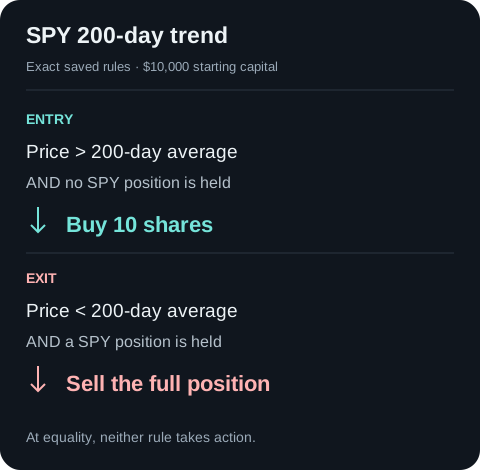
Inspect the request
Connect Claude Code, then preview the exact SPY strategy. The request stops for your rule review.
2. Create your paper portfolio
Save the reviewed rules as a new draft, then approve a separate paper deployment. Keep the running paper portfolio's ID for the steps below.
Use the SPY configuration I just reviewed. Save it as a new chat draft named SPY 200-day trend and read it back. Show the draft ID, $10,000 starting balance and both rules. After I approve paper deployment, deploy that new chat draft as a separate paper portfolio. Find and read back the resulting paper portfolio, verify its type and keep its running ID separately. Stop if the target is an existing live portfolio.3. Check evaluation and review an order
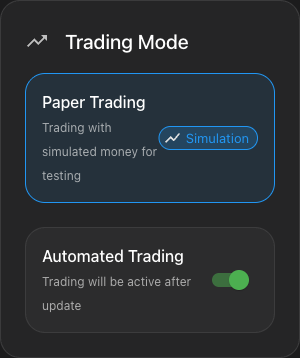
Open the verified running paper portfolio in NexusTrade and inspect its Deployment Center. The Automated Trading switch controls strategy evaluation: if you choose to change it, select Save Changes and read the same portfolio again. Confirm isActive and record the actual deployment frequency. This control is separate from the live-only Autonomous Trading approval policy; paper portfolios remain on manual order review.
When a signal creates a pending simulated order, open Order Management, select Paper and Needs Review, and compare its portfolio, symbol, side and size with the frozen rules before choosing Confirm. Check the resulting order state and paper history. A pending approval is not a filled trade. An empty history can mean no qualifying signal or an unapproved order; it does not justify another deployment.
4. Read the paper history
Use the running paper portfolio ID to read its dated values. Follow all pages for your observation window. A new portfolio can have no fills while it waits for a qualifying signal or order approval.
{
  "portfolio_id": "<verified-running-paper-id>",
  "page": 1,
  "page_size": 500
}
5. Pause the paper portfolio
Review the pause request below with the running paper ID. Read it back afterward and check type:paper and isActive:false. Pausing evaluation keeps holdings and history; review outstanding simulated orders separately.
{
  "operations": [
    {
      "type": "undeploy",
      "portfolioId": "<verified-running-paper-id>"
    }
  ]
}
Open exact configuration and tool reference
Set the observation window
Record the start date, simulated starting capital and strategy version before activation. Decide when you will review activity and which condition would make you pause the test. Keep rule changes and cash changes in the log so you can explain the deployed curve.
Keep draft and deployment identities separate
SDK save writes a draft; deploy creates the running paper portfolio and returns deployment.portfolioId. Those identifiers coexist. The MCP chat deployment path also creates a separate paper book. Use the running book’s ID for history and monitoring.
Inspect the returned deployment type rather than relying on a portfolio name containing the word paper.
Create and monitor a separate paper deployment
Preview the candidate
NexusTrade toolbuild_portfolio
Identity boundaryReview the canonical configuration and fix validation issues before saving
Author the candidate
NexusTrade toolcreate_portfolio
Identity boundaryA newly authored chat portfolio, not an existing live account
Inspect the target
NexusTrade toolget_portfolio
Identity boundaryRead the exact returned ID and strategies before activation
Deploy the chat book
NexusTrade toolupdate_portfolio
Identity boundaryoperations: [{type: "deploy", portfolioId: returnedChatId}] creates paper
Find the running book
NexusTrade toolfetch_portfolios
Identity boundaryKeep the resulting deployment ID separately from the original chat/draft ID
Read actual paper history
NexusTrade toolquery_portfolio_history
Identity boundaryThe deployed portfolio curve; never substitute a backtest curve
Show the table · 6 rows, 3 columns
Scroll sideways to compare all columns. Select a heading to sort.
| Preview the candidate | build_portfolio | Review the canonical configuration and fix validation issues before saving |
| Author the candidate | create_portfolio | A newly authored chat portfolio, not an existing live account |
| Inspect the target | get_portfolio | Read the exact returned ID and strategies before activation |
| Deploy the chat book | update_portfolio | operations: [{type: "deploy", portfolioId: returnedChatId}] creates paper |
| Find the running book | fetch_portfolios | Keep the resulting deployment ID separately from the original chat/draft ID |
| Read actual paper history | query_portfolio_history | The deployed portfolio curve; never substitute a backtest curve |
No matching rows. Clear the filter to see all records.
Deploying an existing live portfolio ID can reactivate real brokerage trading. For this workflow use the newly authored chat candidate and verify the returned deployment is paper. The SDK also separates saved draft IDs from deployment.portfolioId.
Exact validation request and provenance
On October 10, 2026, we built this complete SPY candidate with the NexusTrade Python SDK and sent it to build_portfolio. The product returned valid: true, no issues, and the two canonical rules shown below. The entry buys 10 shares, with a zero-position guard; the exit closes the current holding only when price is strictly below its 200-day average. Equality triggers neither rule.
Copy this complete request into build_portfolio to inspect the same candidate. The preview saved nothing and started no historical test or paper deployment. Use the client steps below to create and observe your own paper draft.
Both returned rules have automaticOrderApproval: false. Keep the saved draft ID, accepted backtest ID and running paper ID in separate fields. The configuration's Day indicator window does not set the deployed book's evaluation schedule.
Show the table · 6 rows, 2 columns
| Product response | Observed value |
|---|---|
| Validation | valid: true; issues: [] |
| Capital | initialValue: 10000 |
| Entry | Buy 10 shares of SPY whenever SPY's price is above its 200-day average price and the portfolio holds no SPY. |
| Exit | Sell 100% of the current SPY position whenever SPY's price is below its 200-day average price and the portfolio holds SPY. |
| Order approval | automaticOrderApproval: false on both returned rules |
| Persistence | Nothing was saved |
No matching rows. Clear the filter to see all records.
{
  "name": "SPY 200-day trend",
  "initialValue": 10000,
  "cash": 10000,
  "buyingPower": 10000,
  "strategies": [
    {
      "name": "Guarded ten-share entry",
      "condition": {
        "type": "And",
        "conditions": [
          {
            "type": "Base",
            "lhs": {
              "type": "Price",
              "targetAsset": {
                "type": "Stock",
                "symbol": "SPY",
                "name": "SPY"
              }
            },
            "comparison": "greaterThan",
            "rhs": {
              "type": "SimpleMovingAverage",
              "targetAsset": {
                "type": "Stock",
                "symbol": "SPY",
                "name": "SPY"
              },
              "window": {
                "length": 200,
                "interval": "Day"
              }
            }
          },
          {
            "type": "Base",
            "lhs": {
              "type": "PositionValue",
              "targetAssets": [
                {
                  "type": "Stock",
                  "symbol": "SPY",
                  "name": "SPY"
                }
              ]
            },
            "comparison": "equal",
            "rhs": {
              "type": "Value",
              "value": 0
            }
          }
        ]
      },
      "action": {
        "type": "Buy",
        "targetAsset": {
          "type": "Stock",
          "symbol": "SPY",
          "name": "SPY"
        },
        "amount": {
          "type": "number of assets",
          "amount": 10
        }
      },
      "orderExecution": {
        "type": "Market"
      }
    },
    {
      "name": "Close below average",
      "condition": {
        "type": "And",
        "conditions": [
          {
            "type": "Base",
            "lhs": {
              "type": "Price",
              "targetAsset": {
                "type": "Stock",
                "symbol": "SPY",
                "name": "SPY"
              }
            },
            "comparison": "lessThan",
            "rhs": {
              "type": "SimpleMovingAverage",
              "targetAsset": {
                "type": "Stock",
                "symbol": "SPY",
                "name": "SPY"
              },
              "window": {
                "length": 200,
                "interval": "Day"
              }
            }
          },
          {
            "type": "Base",
            "lhs": {
              "type": "PositionValue",
              "targetAssets": [
                {
                  "type": "Stock",
                  "symbol": "SPY",
                  "name": "SPY"
                }
              ]
            },
            "comparison": "greaterThan",
            "rhs": {
              "type": "Value",
              "value": 0
            }
          }
        ]
      },
      "action": {
        "type": "Sell",
        "targetAsset": {
          "type": "Stock",
          "symbol": "SPY",
          "name": "SPY"
        },
        "amount": {
          "type": "percent of current positions",
          "amount": 100
        }
      },
      "orderExecution": {
        "type": "Market"
      }
    }
  ],
  "supportsFractionalShares": false,
  "supportsCrypto": false,
  "alertsEnabled": false,
  "dividendPolicy": "cash"
}
Validated example: SPY SMA200
NexusTrade validation recorded October 10, 2026 returned valid:true with no issues. This preview saved nothing and has no forward Paper history.
- Starting capital
- $10,000
Entry
Buy 10 shares of SPY whenever SPY's price is above its 200-day average price and the portfolio holds no SPY.
Exit
Sell 100% of the current SPY position whenever SPY's price is below its 200-day average price and the portfolio holds SPY.
Rule decision example
Hypothetical: SPY at $110, its 200-day average at $100, and no SPY held. The entry proposes buying 10 shares. An existing holding blocks another entry.
Exit and equality
At price equal to the average, neither entry nor exit passes. Below the average with a holding, the exit proposes selling the entire position.
No comments yet.